
Accounting
Featured Products
Management Accounting
Carsten Rohde, Will Seal, Karen Mustard, Ray H. Garrison, Eric Noreen
7th Edition
Accounting and Finance: Understanding and Practice
Neeta Shah, Danny Leiwy, Robert Perks
5th Edition
Introduction to Financial Accounting
Anne Marie Ward, Andrew Thomas, Mike Farrell
10th Edition

Managerial Accounting
Ray H. Garrison, Eric Noreen, Peter C. Brewer, Norma R. Montague
2026 Release
Find Your Fit Quiz
McGraw Hill Connect is an award-winning digital learning solution that enables students to attain better grades and allows instructors to improve course management. Connect Accounting provides an adaptive learning tool that help students target what they know and what they don’t know, while end-of-chapter problems provide challenging practice sessions.

Connect for Accounting Features
Connect is McGraw Hill's course management and adaptive learning platform with ready-made course content, assessment and tools that integrate seamlessly with your own LMS. As an instructor, Connect is an end-to-end solution for your course, providing you with the ability to assign homework and online assessments whilst giving you detailed student analytics and progress reports.
SmartBook
The Smartbook tool integrated within Connect maximises learning by helping students study more efficiently, highlighting the most important points in the chapter, asking verification questions and indicating additional resources.
More personalised - SmartBook constantly adapts to students' needs, creating a personalised learning experience.
More productive - SmartBook creates an extremely productive learning experience, focusing students' attention on the concepts they need to learn.
More prepared - SmartBook helps students prepare for lessons, allowing you to use class time more dynamically.

Practice and Assessment
The huge bank of exercises and quizzes in Connect enables students to consolidate their learning through practice and apply the concepts they have learned in exercises, data analytics problems, discussion cases and projects. With instant feedback and help features, students are able to assess the depth and breadth of their understanding of course objectives, allowing them to target revision at specific concepts helping them learn smarter and stay on track.
For some titles, algorithmic versions of exercises are also available, with numbers randomised so that students can practice problems as many times as they need to ensure that they fully understand each problem.
Analytics
Assignment reports give you granular information about your students' interaction with assignments set through Connect, including how much time students have spent engaging and which concepts your class may be struggling with. All of this data is available at an aggregated or individual level so you can gain deeper insight into students who seem to be struggling and take remedial action. Crucially students also have access to their own data to help them manage their own learning and create informed study plans.
Excel and Tableau Exercises
Excel simulations are available to assign as part of the Question Bank in Connect to help students learn and practise using Excel skills for accounting, such as formulas and formatting. Students work on them within the Connect environment without needing to have their own Excel licence and avoiding version errors. Questions feature videos with Help and Show Me tutorials (when enabled) and automatic feedback and grading.
Excel Analytics exercises that require students to use various Microsoft Excel-based tools such as Goal Seek, PivotTable, and Solver to analyze data and derive solutions. These tools teach students how to use a variety of Data Visualizations techniques, such as charts, graphs, and tables, to communicate their findings. (Available with Garrison, Noreen and Brewer).
Tableau Dashboard Activities easily introduce students to Tableau. Students learn to gather the information they need from a live embedded Tableau dashboard, with auto-graded questions focused on both calculations and analysis. No prior knowledge of Tableau is needed.
Auditing titles also come with IDEA Auditing Software and exercises and assignable, auto-gradable Roger CPA Review multiple choice questions.
General Ledger Problems
How well do your students understand the accounting cycle? Do your students struggle to see the “big picture” in accounting?
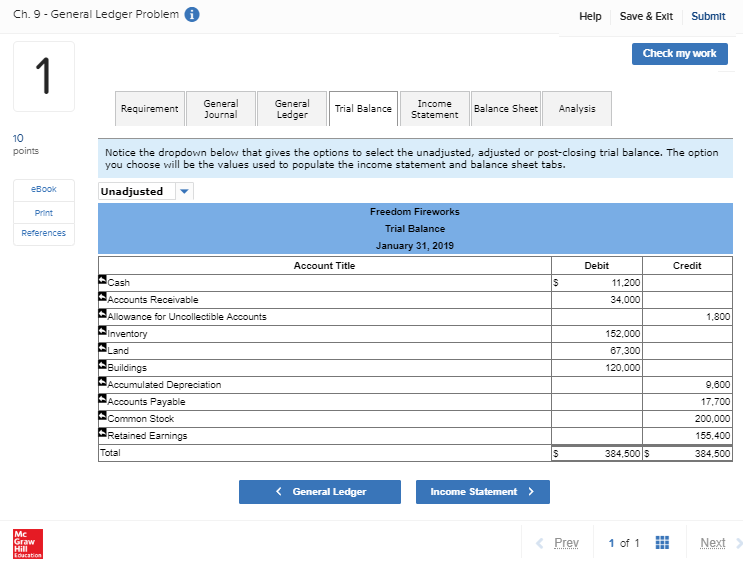
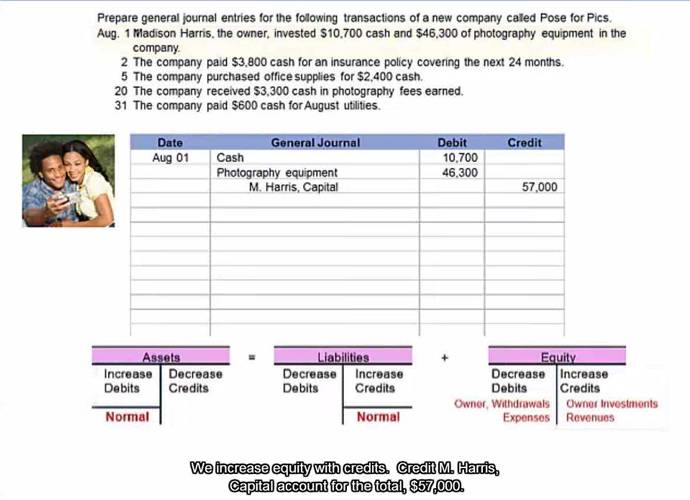
As students learn the accounting cycle, General Ledger Questions in Connect help students understand how journal entries impact various financial statements, and how those financial statements fit together in the context of a business application.
With separate tabs showing General Journal, General Ledger, Trial Balance, Income Statement, Statement of Retained Earnings, Balance Sheet and Financial Statement Impact, students can audit their mistakes by easily linking back to their original entries and are able to see how the numbers flow through the various financial statements.
As students learn, the general ledger questions become more challenging, helping them employ important critical thinking and analysis skills, using the all-important financial statement impact tab.
Guided Examples
As we know, not everyone learns at the same pace, or in the same way. Connect is a great place for students to go if they need more help with a topic, not only with their SmartBook but with a range of other media to help them get unstuck.
The selection of videos available to students will vary according to your base textbook, but for accounting may include:
Concept Overview Videos that provide additional explanation and enhancement of material from the book, allowing students to learn, study and practice with instant feedback at their own pace.
Guided Help Videos offering narrated, animated, step-by-step walkthroughs of algorithmic versions of assigned exercises, providing immediate feedback and focus on the areas where students need the most guidance.
Additional videos may be available linked to features specific to your chosen textbook.
Connect Master: Principles of Accounting
Connect Master is a thoroughly personalized, complete course digital solution that offers a highly adaptive experience within a safe, immersive environment, resulting in a deeper understanding of concepts, increased confidence, and overall success.
Connect Master: Introductory Accounting covers sixteen core modules focusing on key learning outcomes in Introductory Financial and Managerial Accounting. It provides a flexible and modular approach which supports personalized learning and tailored teaching.


Course: Management Accounting
Instructor: Vanessa Egan
Digital Product in Use: Connect with Smartbook, Management Accounting, Seal
Number of Students: 623

Course: Managerial & Corporate Finance
Instructor: George Hulene
Digital Product in Use: Connect with SmartBook for Corporate Finance, Hillier
Number of Students: 220-330

Course: Financial Accounting
Instructor: Professor Diane Bonneau
Product in Use: Connect with Smartbook Fundamentals of Financial Accounting, Philips
Number of Students: 20